aymen frikha
28 July 2021
From notebooks to pipelines with Kubeflow KALE
What is Kubeflow?
Kubeflow is the open-source machine learning toolkit on top of Kubernetes. Kubeflow translates steps in your data science workflow into Kubernetes jobs, providing the cloud-native interface for your ML libraries, frameworks, pipelines and notebooks.
Notebooks in Kubeflow
Within the Kubeflow dashboard, data scientists can spin up notebook servers for their data preparation and model development.
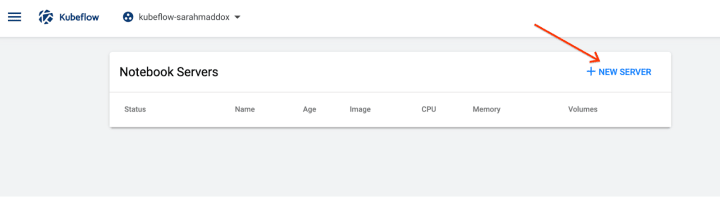
Upon creating the server, users can select among default images, or use a custom image, including one with pre-installed KALE.
What is Kubeflow KALE?
KALE (Kubeflow Automated pipeLines Engine) extends notebooks within Kubeflow in order to allow for automated pipeline creation.

All you have to do is to annotate cells (pieces of your code) within your Jupyter notebook and these tags will be automatically translated into your Kubeflow Pipeline.
You can tag a cell as a component or block indicating that the code within represents a step in your pipeline, and indicate the dependencies of that step (pre: <dependency-name>).
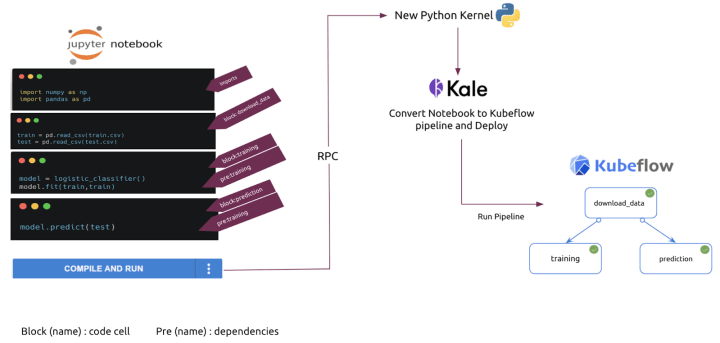
DEMO: Using KALE with Charmed Kubeflow, ElasticSearch and Ceph
In this demo, an Elasticsearch cluster will be used as a data store, a Ceph cluster as object storage to store the resulting models, and a Kubeflow environment is used as a data scientist platform to develop the AI algorithm as well as run the pipeline.
The following diagram shows an overview of the environment:

To set up the environment demo, you can follow the steps mentioned in this repository.
To set up the environment demo, you can follow the steps mentioned in this repository.
After setting up the environment and making sure that everything is running, we can now open a sshuttle tunnel (or an SSH forward) from your machine to the AWS instance using this command:
$ sshuttle -r ubuntu@<EC2 public ip> 10.64.140.43/24
Then we access the Kubeflow dashboard and create a new Jupyter notebook with the Kale container image. We will use the following parameters for the notebook demo:
Name: kale-demo
Custom image: localhost:32000/kale-demo
CPU: 1
MEM: 2 Gi

In a new terminal within this notebook we need to download the financial time series demo notebook:
$ wget https://raw.githubusercontent.com/aym-frikha/kale-demo/master/financial-time-series.ipynb
We need to do some changes to the following notebook parameters that reflect the current environment:
- The endpoint_url (IP of the ceph-radosgw unit)
- The access_key (access key for the ceph user: from ./create-rados-user.sh output)
- The secret_key (secret key for the ceph user: from ./create-rados-user.sh output)
- The elastic_url (IP of the elastic unit)

Now we can enable Kale for this notebook and, in the advanced settings, we need to change the docker image to “localhost:32000/kale-demo”
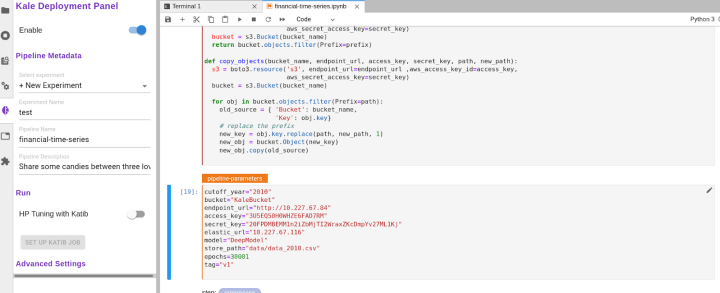
Then we can run the Kubeflow pipeline by hitting the button compile and run.
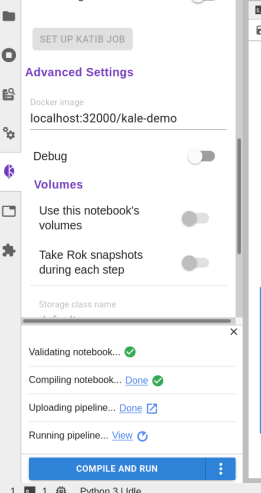
This will compile and run your Kubeflow pipeline.
Finally, if you click on View, you will be redirected to the specific pipeline run just created.

Serving models on Kubernetes
Enterprise computing is moving to Kubernetes, and Kubeflow has long been talked about as the platform to solve MLOps at scale.
KFServing, the model serving project under Kubeflow, has shown to be the most mature tool when it comes to open-source model deployment tooling on K8s, with features like canary rollouts, multi-framework serverless inferencing and model explainability.
Learn more about KFServing in What is KFServing?
Learn more about MLOps
Canonical provides MLOps & Kubeflow training for enterprises alongside professional services such as security and support, custom deployments, consulting, and fully managed Kubeflow – read Ubuntu’s AI services page for details.
Simplify your Kubeflow operations
Get the latest Kubeflow packaged in Charmed Operators, providing composability, day-0 and day-2 operations for all Kubeflow applications including KFServing.